Skip to content

Matchday Thread: Ict -v- Falkirk

inverness.png

Inverness CT

-V-

Falkirk

falkirk.png

Tulloch Caledonian Stadium, 12:30pm

...discuss it during the game in the CHATROOM

LIVE AUDIO COVERAGE

audio_text.gif

Match Commentary

(UK / VPN only)

audio_text.gif

Open All Mics

(not running)

LIVE TEXT COVERAGE
SKY

BBC

P&J

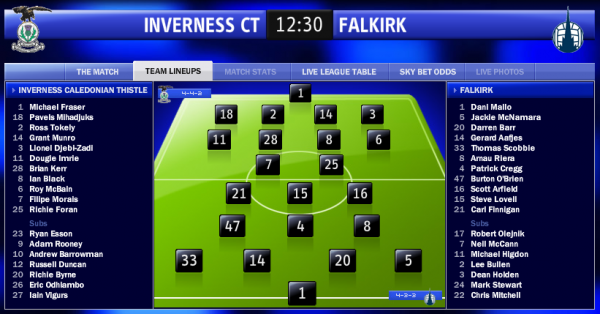
TEAM LINEUPS

post-2-1243076708_thumb.png

AFTER MATCH

Match Stats
  • Replies 102
  • Views 11.1k
  • Created
  • Last Reply

Top Posters In This Topic

Posted Images

Featured Replies

I'm at work here in my newsstand: notebook on, forum opened, and... of course, I'm wearing my ICT shirt!!

Let's go Caley!!

It's going to be a long 30 minutes - all one way traffic now

Falkirk should be saving themselves for the cup :P

Saw that coming!!

noooooooooooooooooooooooo :P :( :(

:P :( :(

C'MON, NOT OVER YET!!!!

Is it just me...or were we giving Falkirk a hell of a lot of space to work the ball? To me...its like we 2 men down at least!

Black's a liability and far too often flatters to deceive. End of.

Hearts should be tearing up the pre-contract.

(Now make me eat my words Ian)

We going down folks. Make preperations for life in First Division!

Oh my.......

:P

Come on Inverness, last few minutes! :P

Come on Inverness, last few minutes! :(

Last few minutes in SPL, I fear...

:P

I don't care how they get it in just bloody do it!

...and if we come up against Ross County, break that b??$!*& Brewster's legs.

Looking that way

League doesnt lie! We been **** all season. That F****r brewster destroyed us!

predicatbly **** result, on the plus side at least I won't be staying up all night listening to us next season...

ah well - nothing to look forward now except 6 pts against county next season before they go under

Create an account or sign in to comment

Recently Browsing 0

  • No registered users viewing this page.

Important Information

We have placed cookies on your device to help make this website better. You can adjust your cookie settings, otherwise we'll assume you're okay to continue. : Terms of Use : Guidelines : Privacy Policy

Account

Navigation

Search

Search

Configure browser push notifications

Chrome (Android)
  1. Tap the lock icon next to the address bar.
  2. Tap Permissions → Notifications.
  3. Adjust your preference.
Chrome (Desktop)
  1. Click the padlock icon in the address bar.
  2. Select Site settings.
  3. Find Notifications and adjust your preference.