Skip to content

ball

THE MATCHDAY THREAD

Discuss ICT & other games in this thread as they happen
ball
team logo

Ross County -V- Inverness CT

team logo
25th Feb 2014 @ 7:45PM

Global Energy Stadium, Dingwall

twitter icon Follow us on Twitter
facebook icon Follow us on Facebook
chat Go to the Chatroom
ie

Media Coverage

ff
AUDIO


TEXT
VIDEO

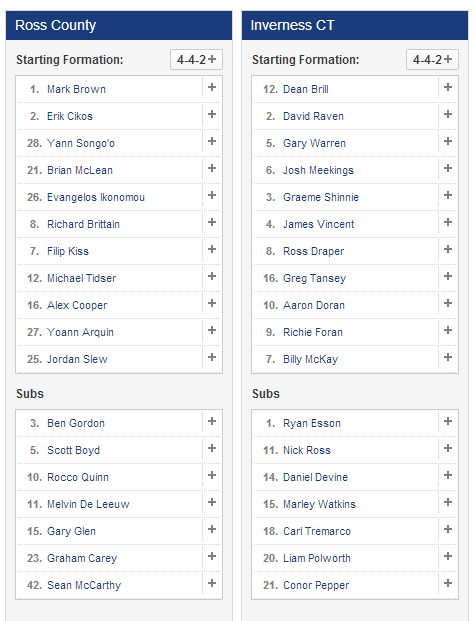
TEAM LINEUPS
post-2-0-87731700-1393356598.png

Dont forget to keep your ticket stubs in case the lights go out again !

DalyEmbed_35_1837950a.jpg


  • Replies 129
  • Views 21k
  • Created
  • Last Reply

Top Posters In This Topic

Most Popular Posts

  • Normal service resumes.

  • SPFL highlights

  • Absolutely fantastic performance all round tonight. I've never seen them so fired up for the derby game at Dingwall before and before the end County were well beaten and we made fools of them long bef

Posted Images

Featured Replies

Powerful looking team, but not much obvious width in it.  :ponder:

Dave the rave !!! 1-0 to us

Edited by PerthICT

Nothing being said about us on OAm but twitter sayig ICT playing lovely football

SHINNIE NEAR MISS ICT ON THE BREAK SENSATIONAL

Edited by bughtmaster

Robbo's comments on OAM have been very encouraging - sounds like we're inviting County onto us and then breaking with real invention. Would be nice if we could reinforce the superior play with another goal or two.

35. Shinnie with a monster tackle on Cikos. Wins the ball after starting his slide 40 feet away. Roughly 40.


loving this tweet from official ict!

2-0 he scores when he wants ....

Billy does it again  thats the way to do it

What a great first half, sounds like we deserve it

Exactly what we needed.  :smile:

Bloody hell. 2-0 Aberdeen. And two ex-ICT players.

Well done lads: sounds like we've got the right game plan tonight. Any sign of an Adams seethe yet?

Billy needed that bad, wouldn't surprise me if he scores again in the second half

m ore of the same yogi

Create an account or sign in to comment

Recently Browsing 0

  • No registered users viewing this page.

Important Information

We have placed cookies on your device to help make this website better. You can adjust your cookie settings, otherwise we'll assume you're okay to continue. : Terms of Use : Guidelines : Privacy Policy

Account

Navigation

Search

Search

Configure browser push notifications

Chrome (Android)
  1. Tap the lock icon next to the address bar.
  2. Tap Permissions → Notifications.
  3. Adjust your preference.
Chrome (Desktop)
  1. Click the padlock icon in the address bar.
  2. Select Site settings.
  3. Find Notifications and adjust your preference.