Skip to content

ICT -V- Dundee Utd

ball

THE MATCHDAY THREAD

Discuss ICT & other games in this thread as they happen
ball
home team logo

I.C.T. -V- Dundee Utd

away team logo
29/09 @ 3PM, Tulloch Caledonian Stadium
twitter icon Follow us on Twitter
facebook icon Follow us on Facebook
chat Go to the Chatroom
ie

Media Coverage

ff
AUDIO
TEXT
VIDEO
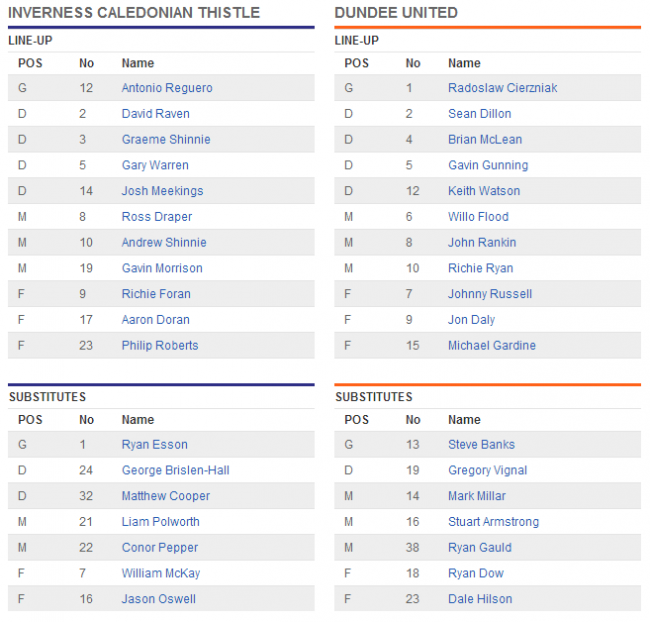
TEAM LINEUPS
post-2-0-56186700-1348927903_thumb.png

  • Replies 104
  • Views 17.7k
  • Created
  • Last Reply

Top Posters In This Topic

Most Popular Posts

  • The only people who should be embarrassed are the "fans" who have chosen to turn their back on the team.

  • absent friend
    absent friend

    I think a wee mention should go to Luke for keeping the faith and at last getting his just rewards, having fought off the keyboard negative attacks almost single handed!!

  • I think that game single handedly dispels this nonsense of how this team can't and should not attempt to play attacking football. The breaks forward and surges into the box on Saturday looked dangero

Posted Images

Featured Replies

I suppose live by the off the cuff remark, die by the on the cuff remark

But the world will spin to my next report

Some say this some say that but I say " well that's for me to know and you to think about".

OK I will say it, in 60 years of watching professional football, No 23 is as bad as it gets.".

Well, that clarifies that, then. :shrug:

eleven tins of beans please. We can all get things wrong in spelling, but it can be more important to spell the team more consistantly, Lawrence.

Ignorance is bliss they say.........send in the violins.

You may have watched but did you see?

The player number twenty three.

Laurence, I've read some sh*te on this forum in my time, but consider the biscuit taken.

Lordy.

Create an account or sign in to comment

Recently Browsing 0

  • No registered users viewing this page.

Important Information

We have placed cookies on your device to help make this website better. You can adjust your cookie settings, otherwise we'll assume you're okay to continue. : Terms of Use : Guidelines : Privacy Policy

Account

Navigation

Search

Search

Configure browser push notifications

Chrome (Android)
  1. Tap the lock icon next to the address bar.
  2. Tap Permissions → Notifications.
  3. Adjust your preference.
Chrome (Desktop)
  1. Click the padlock icon in the address bar.
  2. Select Site settings.
  3. Find Notifications and adjust your preference.