Skip to content

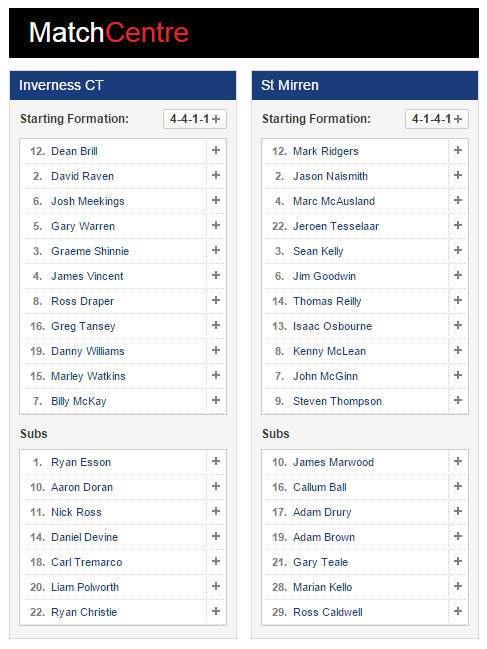
Inverness CT -V- St Mirren

ball

THE MATCHDAY THREAD

Discuss ICT & other games in this thread as they happen
ball
home team logo

Inverness CT -V- St Mirren

away team logo
2nd Dec 2014 @ 19:45, Tulloch Caledonian Stadium
twitter icon Follow us on Twitter
facebook icon Follow us on Facebook
chat Go to the Chatroom
ie

Media Coverage

ff
AUDIO
TEXT
VIDEO
post-2-0-99298800-1417548721.png


  • Replies 56
  • Views 8.5k
  • Created
  • Last Reply

Top Posters In This Topic

Most Popular Posts

  • Great result! Going by the statistics we totally dominated them. We didn't want Partick in the next round but I'll bet they wanted us even less! Thank you players,coaches and management.

  • Thank you to all the players and staff of ICT for a superb night's entertainment on a chilly evening. Four goals by four different players. Pity the BBC Radio Scotland match report could only concentr

  • Congrats to the players and staff !

Posted Images

Featured Replies

Or will we get the same treatment as Sportscene on Saturday with less than a minute to show just the goals...


No, it's far better, this time we get a whole 80 seconds to show just the goals  :frustrated01:


Fixed that for you. ​  :whistle:


Ha ha yeah I posted the link before I actually watched it. Now that I have your description is definitely more accurate!

I C T......... Inverness the Cinderella......... of SPFL

That would be ITC!? But, yeah we are the Cinderella club - but there's nothing Grimm about that - except that nobody wants to come to the ball with us!

Yeah but like the ugly sisters saw, the boot goes on the other foot in the end, so don't despair we are going to have a happy ending to this media pantomime.

Create an account or sign in to comment

Recently Browsing 0

  • No registered users viewing this page.

Important Information

We have placed cookies on your device to help make this website better. You can adjust your cookie settings, otherwise we'll assume you're okay to continue. : Terms of Use : Guidelines : Privacy Policy

Account

Navigation

Search

Search

Configure browser push notifications

Chrome (Android)
  1. Tap the lock icon next to the address bar.
  2. Tap Permissions → Notifications.
  3. Adjust your preference.
Chrome (Desktop)
  1. Click the padlock icon in the address bar.
  2. Select Site settings.
  3. Find Notifications and adjust your preference.