



Leaderboard
-
tm4tj
08: Site Admin5Points18,079Posts -
Gringo
07: Moderators1Points10,011Posts -
The Mantis
07: Moderators1Points7,724Posts -
caley100
+05: Player Sponsor1Points5,602Posts




Popular Content
Showing content with the highest reputation on 07/01/2026 in all areas
-
2 pointsNot sure why Kane wasn't booked for diving to be honest. Left both his feet together when he could easily have got over the keeper. Why did he do that? Because he was losing the ball.2 points
-
2 points
-
1 pointWho cares, the players can use it to bet on horses if they want to. I’m not sure if they ate Subway when we won the Scottish Cup, maybe someone can confirm.1 point
-
1 point
-
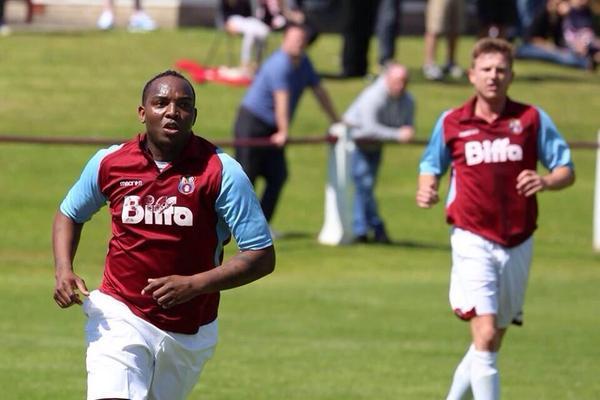
1 pointWhen I was helping out Whitehill Welfare back in the day we had Macron which went down well with the players. Coincidentally they play in claret & blue. However I think the sponsor’s transfer was a bit dodgy, as seen here on one of our players whom you may recognise, but I can’t remember if it came from Macron with the logo on or not. I took it myself btw, no AI here 😂
 1 point
 -
1 pointSecond half at Grant Street: 45' | 0-1 HT Subs for ICTFC: Logan Ross and Trialist (No 15) on, Ross Munro and Danny Devine off 51' | 1-1 Goal. Mikey Mackenzie equalises for Clach 61' | 1-1 ICTFC Subs: Trialist (No 14), Trialist (No 20), Alfie Bavidge on Morgan Bates, Liam Sole and Luis Longstaff off 73' | 1-1 Sam Thompson and Shae Keogh on, Adam Mackinnon and Paul Allan off 75' | 1-1 Noa Boutin picks out Shae Keogh but his effort is turned just wide. 82'| 1-2 GOAL! Trialist (No 14) gives us the lead! They can't kid us. It's our very own Dan Mackay. 85' | 1-3 GOAL! Shae Keogh makes it 3-1! And that's how it finished... FULL TIME: 1-31 point
-
1 pointI too like a flutter on the footy. Actually ended up in profit last season [thank you Stevenage] but I wouldn't advertise. So many people are affected by gambling and lots of other things including booze. It's a personal choice of course. I've not bought a team shirt for a good few seasons now, I find them far to expensive for what they are and stick to the casual / leisurewear range.1 point
This leaderboard is set to London/GMT+01:00